
MyBatis
mapper代理开发
mybatis-config.xml 包扫描
如果Mapper接口名称和SQL映射文件名称相同, 并在同一目录下, 则可以使用包扫描的方式简化SOL映射文件的加载 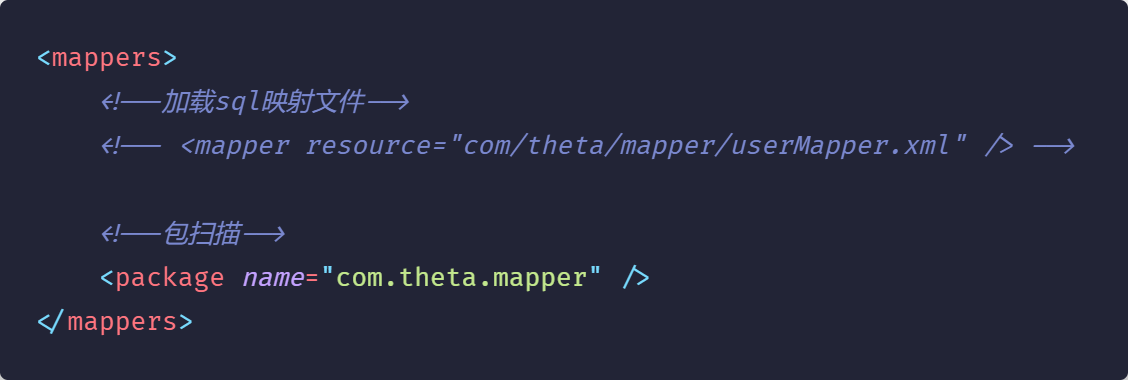
mybatis核心配置文件mybatis-config.xml
一些参数
<property name="url" value="jdbc:mysql:///database_name?useSSL=false&useServerPrepStmts=true" />jdbc:mysql://: 这是JDBC连接MySQL数据库的标准前缀。jdbc 表明这是一个JDBC连接,mysql 指定数据库类型为MySQL。
///login: 这部分指定了要连接的数据库名称。在这个例子中,数据库名为 login。三个斜线(///)之前通常会有服务器地址和端口号,例如 jdbc:mysql://localhost:3306/login,其中 localhost 是服务器地址,3306 是MySQL的默认端口号。如果省略服务器地址和端口号(如示例所示),则默认连接到本地服务器上的MySQL实例。
?useSSL=false: 这是一个参数,指定是否使用SSL(Secure Sockets Layer)来加密客户端和服务器之间的通信。在这个例子中,useSSL=false 表示不使用SSL加密通信。这对于开发环境或内网环境可能是可接受的,但在生产环境中,建议启用SSL以保证数据传输的安全性。
&useServerPrepStmts=true: 这是第二个参数,使用 &(HTML中的“&”符号的实体编码)与前一个参数分隔。useServerPrepStmts=true 表示启用服务器端预处理语句的缓存。预处理语句可以提高数据库操作的效率,并减少SQL注入的风险。true 值表示启用此功能。
类型别名
由于 userMapper.xml 里的 resultType 太麻烦
<select id="selectAll" resultType="com.theta.pojo.User"> select * from tb_user; </select>可以在mybatis-config.xml加上 (pojo 是装User和Brand实体类的)
<!--别名-->
<typeAliases>
    <package name="com.theta.pojo" />
</typeAliases>
再在userMapper.xml里使用 (resultType 里填的是实体类名)
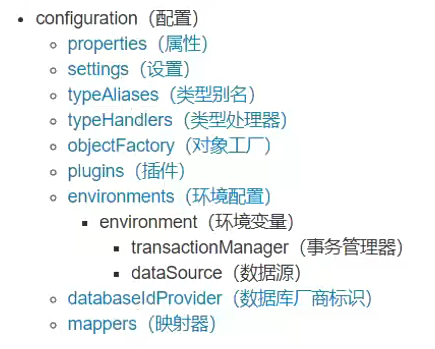
<select id="selectAll" resultType="User"> select * from tb_user; </select>结构顺序
实体类属性名 和 数据库表列名 不一致,不能自动封装数据
Brand {id=1, brandName='null', companyName='null', ordered=5, description='好吃不上火', status=0}原因: 数据库中的tb_brand表里的brand_name 和 company_name字段与Brand实体类的brandName和companyName属性名称不一致
解决方法:
sql语句的as语法 (麻烦)
xml<select id="selectAll" resultType="Brand"> select id, brand_name brandName, company_name companyName, ordered, description, status from tb_brand; </select><sql>片段 (不灵活)
xml<sql id="brand_column">id, brand_name as brandName, company_name as companyName, ordered, description, status</sql> <select id="selectAll" resultType="brand">select<include refid="brand_column" />from tb_brand;</select>resultMap (常用)
xml<resultMap type="Brand" id="brandResultMap"> <result column="brand_name" jdbcType="VARCHAR" property="brandName" /> <result column="company_name" jdbcType="VARCHAR" property="companyName" /> </resultMap> <select id="selectAll" resultMap="brandResultMap"> select * from tb_brand; </select>xml<resultMap type="实体类" id="brandResultMap"> <result column="数据库普通字段名" jdbcType="数据库字段类型(大写)" property="实体类属性名" /> <id column="数据库主键名" jdbcType="数据库主键类型(大写)" property="实体类属性名" /> </resultMap> <select id="selectAll" resultMap="brandResultMap"> select * from tb_brand; </select>
selectById 占位符与SQL注入
参数占位符:
- #{}: 执行sQL时,会将#{}占位符替换为?, 将来自动设置参数值
- ${}: 拼SQL。会存在SQL注入问题
- 使用时机:
- 参数传递,都使用#{}
- 如果要对表名、列名进行动态设置,只能使用${}进行sql拼接。
parameterType:用于设置参数类型,该参数可以省略
xml<select id="..." parameterType="int"></select>SQL 语句中特殊字符处理转义字符
<![CDATA[内容]]>
selectByCondition 多参数
散装参数 BrandMapper接口
javaList<Brand> selectByCondition(@Param("status") int status, @Param("companyName") String companyName, @Param("brandName") String brandName);在形参前加上@Param("属性名") 属性名是BrandMapper.xml里的
#{属性名}xml<select id="selectByCondition" resultMap="brandResultMap"> select * from tb_brand where status = #{status} and company_name like #{companyName} and brand_name like #{brandName} </select>对象参数 BrandMapper接口
javaList<Brand> selectByCondition(Brand brand);test ( 直接传对象 )
javaBrand HuaWei = new Brand(); HuaWei.setBrandName(brandName); HuaWei.setCompanyName(companyName); HuaWei.setStatus(status); List<Brand> brands = brandMapper.selectByCondition(HuaWei);map参数 interface
javaList<Brand> selectByCondition(Map map);传一个map进来,
Map<#{prop}, value>javaMap map = new HashMap(); map.put("status", status); map.put("companyName", companyName); map.put("brandName", brandName);map的key依旧是BrandMapper.xml里的#{prop}里的内容
动态条件查询
多条件 (当用户输入的参数数量不定时)
<select id="selectByCondition" resultMap="brandResultMap">
    select * from tb_brand
    <where>
        <if test="status != null">
            status = #{status}
        </if>
        <if test="companyName != null and companyName != '' ">
            and company_name like #{companyName}
        </if>
        <if test="brandName != null and brandName != '' ">
            and brand_name like #{brandName}
        </if>
    </where>
</select><where>: 代替SQL的where关键字, 防止了and关键字的问题 <if>: test 属性里填判断条件 (or/and, !=, ==) (条件里比较的值是java对象属性, 而不是数据库字段名)
对于字符串数据的判断: 不为null, 不为空字符串
单条件 ( 用户输入一个参数 )
不使用
<where>xml<select id="selectByConditionSingle" resultMap="brandResultMap"> select * from tb_brand where <choose> <when test="status != null"> status = #{status} </when> <when test="companyName != null and companyName != '' "> company_name like #{companyName} </when> <when test="brandName != null and brandName != '' "> brand_name like #{brandName} </when> <otherwise> 1 = 1 </otherwise> </choose> </select><choose>: Switch<when>: case<otherwise>: default (1=1 是为了防止用户什么都没选时, 传进来的对象没有属性)使用
<where>xml<select id="selectByConditionSingle" resultMap="brandResultMap"> select * from tb_brand <where> <choose> <when test="status != null"> status = #{status} </when> <when test="companyName != null and companyName != '' "> company_name like #{companyName} </when> <when test="brandName != null and brandName != '' "> brand_name like #{brandName} </when> </choose> </where> </select>
add 增加数据
MyBatis事务
openSession():默认开启事务,进行增删改操作后需要使用sqlSession.commit();手动提交事务 openSession(true):可以设置为自动提交事务(关闭事务)
主键返回
在插入数据之后, 获取新对象的id
<insert id="add" useGeneratedKeys="true" keyProperty="id">keyProperty: 填主键id所对应的 对象属性名
修改
修改全部字段
brandMapper.java (update类型SQL语句返回影响行数)
int update(Brand brand);brandMapper.xml (update标签不用加多余属性, 留一个id足矣)
<update id="update">
    update tb_brand
        set
            brand_name = #{brandName},
            company_name = #{companyName},
            ordered = #{ordered},
            description = #{description},
            status = #{status}
        where
            id = #{id};
</update>
修改动态字段
<set>: 代替SQL的set关键字
如果不使用
<set>, 则会导致sql语句逗号问题和set关键字残留问题
<if>条件里的test属性比较的值是java对象属性, 而不是数据库字段名
<update id="update">
    update tb_brand
    <set>
        <if test="brandName != null and brandName != '' ">
            brand_name = #{brandName}
        </if>
        <if test="companyName != null and companyName != '' ">
            company_name = #{companyName}
        </if>
        <if test="ordered != null">
            ordered = #{ordered}
        </if>
        <if test="description != null and description != '' ">
            description = #{description}
        </if>
        <if test="status != null">
            status = #{status}
        </if>
    </set>
    where id = #{id};
</update>
删除
删除一个
注意delete语法 (不是delete *, 直接delete from)
<delete id="deleteById">
    delete from tb_brand where id = #{id};
</delete>
批量删除 (接受一个id数组)
不使用@param注解
void deleteByIds(int[] ids);则要在<foreach>的collection属性里填上array
填array的原因: mybatis会将数组参数, 封装为一个Map集合. 而且该map集合的键值关系是 "array": 该数组
<delete id="deleteByIds">
    delete from tb_brand where id in
    <foreach collection="array" item="id" separator="," open="(" close=")">
        #{id}
    </foreach>
    ;
</delete>
注意: 不要忘记
separator=","和 分号
使用@param注解
注意@param的格式: 括号里面放xml里<foreach>的collection属性的值
void deleteByIds(@Param("ids") int[] ids);使用@param注解可以自定义collection的值
<foreach collection="ids" item="id" separator="," open="(" close=")">参数传递
多个参数
List<Brand> select(@Param("brandName") String bandName, @Param("companyName") String companyName);对于多参数, mybatis会将参数封装成一个map集合, 每个参数有两个键名
{"arg0": brandName, "param1": brandName, "arg1": companyName, "param2": companyName}@param注解替换的是"arg"键
单个参数
- P0J0类型: 直接使用, 属性名 和 参数占位符名称 一致
- Map集合: 直接使用, 键名 和 参数占位符名称 一致
- Collection: 封装为Map集合 map.put("arg0", collection集合); map.put("collection", collection集合);
- List: 封装为Map集合 map.put("arg0", list集合); map.put("collection", list集合); map.put("list", list集合);
- Array: 封装为Map集合 map.put("arg0", 数组); map.put("array", 数组);
- 其他类型: 直接使用
注解开发
实现一些简单SQL语句, 复杂操作还是要使用xml配置文件
@Select("select * from tb_brand where id = #{id}")
Brand selectById(Integer id);
@Select("xml里的SQL语句")
关于SqlSessionFactory
String resource = "mybatis-config.xml";
InputStream inputStream = Resources.getResourceAsStream(resource);
SqlSessionFactory sqlSessionFactory = new SqlSessionFactoryBuilder().build(inputStream);
两个问题:
- 代码冗余
- 资源浪费: 每个SqlSessionFactory都绑定了一个连接池
public class SqlSessionFactoryUtils {
 private static SqlSessionFactory sqlSessionFactory;

 static {
  // 静态代码块会随着类的加载而自动执行,且只执行一次

  String resource = "mybatis-config.xml";
  try (InputStream inputStream = Resources.getResourceAsStream(resource)) {
   sqlSessionFactory = new SqlSessionFactoryBuilder().build(inputStream);
  } catch (IOException e) {
   e.printStackTrace();
  }
 }

 public static SqlSessionFactory getSqlSessionFactory() {
  return sqlSessionFactory;
 };
}
关于分页查询
分页查询的SQL语句一定要记得加resultMap
<select id="selectByPage" resultMap="brandResultMap">
  select * from tb_brand limit #{begin}, #{size};
</select>使用count()查询总条目数时不需要加resultMap!
<select id="selectTotalCount">
  select count(*) from tb_brand;
</select>
报错
java.sql.SQLNonTransientConnectionException: Public Key Retrieval is not allowed
https://blog.csdn.net/white0718/article/details/131790493
在命令行模式下进入mysql,输入以下命令:
sql-- 有效 ALTER USER 'root'@'localhost' IDENTIFIED WITH mysql_native_password BY 'root';或者
sql-- 有问题 ALTER USER 'root'@'%' IDENTIFIED WITH mysql_native_password BY 'root';java.lang.NoClassDefFoundError: org/apache/ibatis/io/Resources
打包后的web应用里的lib文件夹里没有对应jar包
大概率是使用vscode, 但没有进行package
所以要记得在导完依赖之后进行package